Version scope: This checklist covers Next.js 15. Check the documentation for your installed version before applying version-dependent APIs or build commands. It is guidance, not a report of measured client results.
The repeatable checks we use for rendering, images, fonts, JavaScript, metadata and production smoke tests before launch.
Key takeaways
- Select rendering per route rather than making the whole application dynamic.
- Reserve image and font geometry to protect Core Web Vitals.
- Keep client JavaScript at genuine interaction boundaries.
- Verify the production server, metadata and critical routes instead of relying only on type checking.
Choose the cheapest rendering model
Performance work begins with architecture. Marketing pages and stable content should be statically generated. Server rendering is reserved for genuinely request-specific data, and client components are kept at interaction boundaries instead of wrapping entire pages.
This keeps the default JavaScript budget small and lets the browser receive useful HTML immediately. We inspect the production route report after every meaningful change because development mode does not show the real cost.
Treat media and fonts as layout
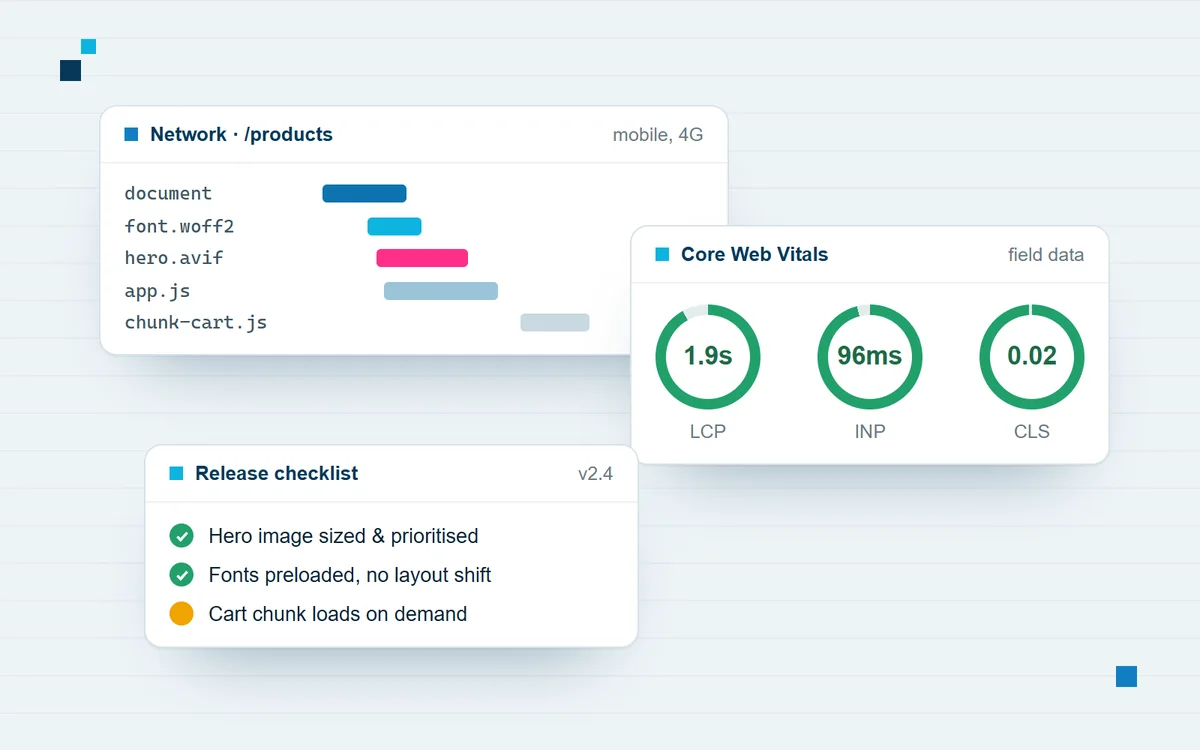
Every image has explicit dimensions or a constrained fill container. The largest above-the-fold image is prioritised; everything else loads lazily. Local placeholders prevent remote-domain surprises, while production remote sources are narrowly listed in Next configuration.
Fonts use next/font with only required weights and swap behaviour. Headings and card grids reserve their final space so loading does not move the page underneath the user.
Audit the interaction budget
We question every client component and third party script. Motion respects reduced motion preferences, scroll listeners are passive and cleaned up, and analytics loads without blocking the main experience. Dynamic imports are useful when they remove meaningful code from the initial route, not when they merely wrap tiny components.
Verify the build people will run
A release gate can include the version-appropriate type checks, linting and production build followed by a real next start smoke test. We probe important routes, generated sitemap and robots files, and the browser icon. Lighthouse helps find regressions in performance, accessibility and SEO, but its score supports manual checks of focus order, headings, landmarks and content clarity rather than replacing them.
Set a route-level performance budget
A global target is useful, but route-level budgets expose the decisions that create regressions. We record the shared JavaScript baseline and expected size for the homepage, article pages and interactive forms. A content page should not inherit the cost of an editor, chart library or account dashboard simply because those features exist elsewhere in the application.
Build output is reviewed in pull requests, and unusually large client chunks trigger investigation. We look for accidental client boundaries, barrel imports that pull in unused code, duplicated libraries and components that can render on the server. Budgets are guardrails rather than vanity numbers: they protect users on ordinary mobile devices and connections.
Measure the Core Web Vitals causes
Largest Contentful Paint usually points to server response, render-blocking resources or an above-the-fold asset. Interaction to Next Paint often reveals long JavaScript tasks or event handlers doing too much work. Cumulative Layout Shift identifies elements whose final geometry was unknown. We debug the cause instead of applying generic optimisation checklists.
Laboratory tools provide reproducible diagnostics, while field data shows what real visitors experience across devices and networks. Preserve both views. A fast local Lighthouse run cannot prove that a third-party script behaves well for every user, and field data without traces cannot explain which component needs to change.
Make metadata and structured data route-specific
Every indexable route receives a descriptive title, useful summary and canonical URL. Article routes add publication and modification dates, authorship and a relevant social image. Because Next.js merges nested metadata shallowly, a child Open Graph object must intentionally carry the fields it needs rather than assuming every value survives from the root layout.
Structured data must match visible content. Organization schema belongs at the site level; Article and Breadcrumb schema belong on each post; Service schema belongs on service pages. We validate generated HTML, not only TypeScript objects, because the rendered tags are what crawlers and social platforms consume.
Control third-party and analytics cost
Analytics, chat, consent and advertising scripts often become the largest uncontrolled part of a marketing site. We document the business owner for each script, load it at an appropriate stage and remove integrations that no longer support a decision. A tag manager is not permission to bypass performance review.
Event tracking is designed around a concise measurement plan. Delegated event handlers and lightweight first-party endpoints can reduce duplicated browser work. Consent choices are respected before optional scripts load, and we verify that measurement does not shift content, trap focus or delay the primary interaction.
Test accessibility as part of performance
Fast pixels are not a fast experience when keyboard users cannot reach a menu or screen-reader users must navigate duplicated landmarks. We check heading order, landmarks, focus visibility, labels, reduced motion and contrast alongside loading metrics. Semantic HTML usually improves accessibility and reduces the JavaScript otherwise needed to recreate browser behaviour.
The final smoke test covers small and large viewports, keyboard navigation and reduced-motion settings. Automated checks catch repeatable mistakes, but manual review catches confusing reading order, vague link text and interactions whose state is technically exposed but difficult to understand.
Monitor after deployment
Performance is a production property, not a launch-day certificate. We monitor field vitals, error rate, route latency and conversion events after release. Deploy annotations help correlate regressions with code or content changes, while synthetic checks confirm that critical pages, sitemap files and forms remain available.
When a regression appears, the response should be specific: identify the affected route and population, compare the relevant deployment, reproduce the bottleneck and add a guardrail that prevents recurrence. This closes the loop between the checklist, actual visitors and the next engineering decision.
Official documentation
See the Next.js 15 guides to image optimization and font optimization for supported configuration and API details.
Related implementation services
Explore web application and Next.js development or cloud deployment and DevOps services to connect this guidance with a scoped project.